Teacher Demonstration
Use the live model as a shared screen demonstration before students try their own predictions and observations.
Explore Three States Of Matter Model as an interactive EJS simulation for mechanics.
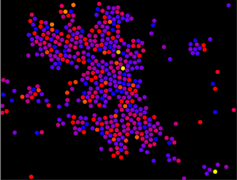
Use the live model as a shared screen demonstration before students try their own predictions and observations.
Open the simulation, adjust the controls, and compare what changes on screen before answering the concept-check questions.
How does the particle motion change when the thermal condition is changed, and what macroscopic effect does that explain?
Ask students to describe particle motion before naming the thermal concept. Focus on speed, spacing, and collisions.
Increase or decrease the temperature setting if available, then compare particle speed and collision frequency.
Use the observed particle behaviour to explain a macroscopic quantity such as temperature, pressure, or state.
Ask which parts of the animation are useful simplifications and which should not be taken as exact pictures of real molecules.
Use the model as a bridge from visible random motion to the kinetic model of matter. Let students first describe what they see, then introduce average kinetic energy and collisions as explanatory ideas.
Ask: What changes when the temperature setting changes? What evidence suggests the particles have more kinetic energy? How could invisible particle motion explain pressure, diffusion, or Brownian motion?
Avoid letting students treat the animation as decorative. Require a before-and-after comparison and a sentence that links microscopic particle behaviour to a measurable or visible macroscopic effect.
These questions are generated from the topic and the concept illustrated by the simulation. Use them after students have explored the model.
Correct first attempts build a streak and unlock higher point multipliers on this device.
1. What does Brownian motion or molecular motion help students infer?
2. When temperature is increased in a kinetic model, what should generally happen to particle motion?
3. Why is a simulation useful for kinetic theory?
4. What comparison gives the clearest evidence?
5. What is a strong explanation after using the model?
Unlocks after 3 correct concept-check answers on this page.
1. In a states-of-matter interactive, what particle evidence should students use to distinguish solid, liquid, and gas?
2. What feedback fits 'melting means the particles become a different substance'?
3. During condensation in the model, what should students observe at particle level?
4. What is the expert correction for 'solid particles do not move at all'?
5. What makes a state-change conclusion expert-level?
Anonymous activity shows this resource is being discovered, revisited, and used by learners in different places.
Country or region is inferred anonymously from server location headers when available. No names, accounts, or IP addresses are shown.