Teacher Demonstration
Use the live model as a shared screen demonstration before students try their own predictions and observations.
Explore Potential Difference as an interactive EJS simulation for electricity and magnetism.
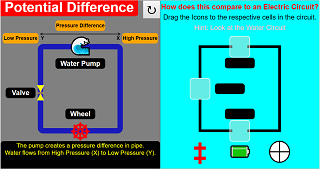
Use the live model as a shared screen demonstration before students try their own predictions and observations.
Open the simulation, adjust the controls, and compare what changes on screen before answering the concept-check questions.
How do the circuit connection and meter readings explain the change in current, voltage, resistance, or power?
Find the supply, component, switch, and current path before changing values.
Record voltage and current readings with units.
Alter voltage or resistance while keeping the other setting clear.
Use V, I, and R to explain the observed change.
Use this as a quantitative evidence task. Ask students to quote a meter reading before making an Ohm's law claim.
Ask: Which quantity changed? Which quantity was held fixed? How do the readings support V = IR?
Use paired cases with only one changed value, then ask students to predict the next reading before checking the model.
These questions are generated from the topic and the concept illustrated by the simulation. Use them after students have explored the model.
Correct first attempts build a streak and unlock higher point multipliers on this device.
1. In an Ohm's law or resistor interactive, what should students compare?
2. For the same potential difference, what happens when resistance increases?
3. What does a straight-line V-I graph through the origin suggest for a resistor?
4. What evidence should be cited when a variable resistor is changed?
5. What makes a DC-circuit conclusion strong?
Unlocks after 3 correct concept-check answers on this page.
1. In an Ohm's law or resistor interactive, what should students compare?
2. What feedback fits 'higher resistance always gives higher current for the same battery'?
3. How should students interpret a straight-line V-I graph through the origin?
4. What is a fair test for a variable resistor?
5. What makes a DC-circuit answer expert-level?
Anonymous activity shows this resource is being discovered, revisited, and used by learners in different places.
Country or region is inferred anonymously from server location headers when available. No names, accounts, or IP addresses are shown.