{source}
<?php  require_once JPATH_SITE.'/TTcustom/TT_contentparser.php';\(parameters = array("topicname" => "math/Plotter_3D_Surfaces", "modelname" => "ejss_model_Eye_catcher");echo generateSimHTML(\)parameters, "EJSS");
?>
{/source}
1. Introduction:
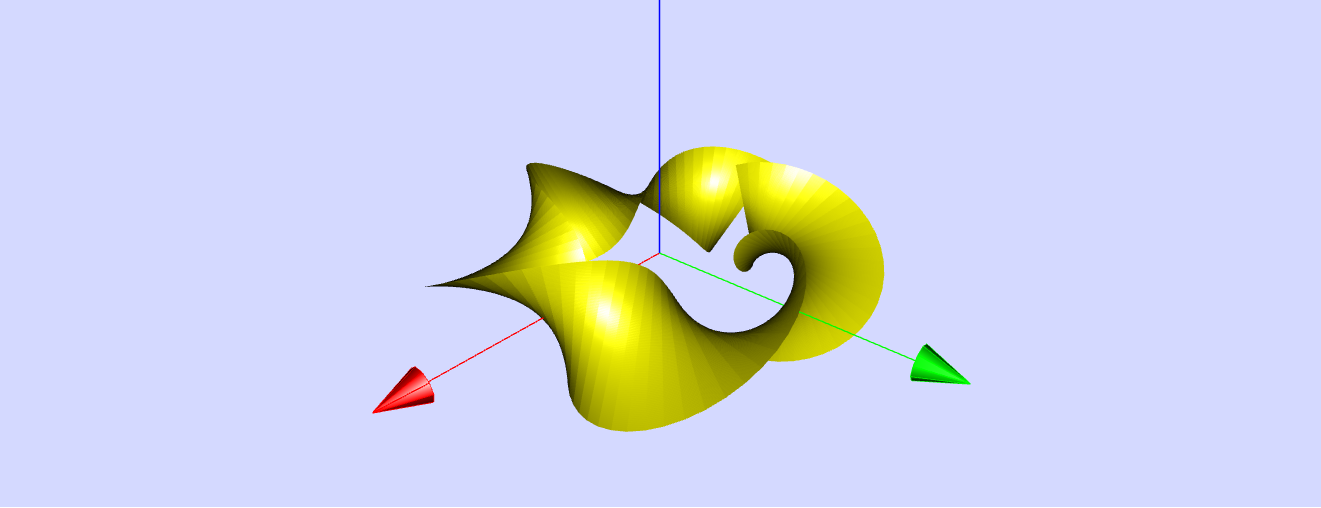
This briefing document reviews the "Eye Catcher 3D Surface JavaScript Simulation Applet HTML5," an interactive resource available through Open Educational Resources / Open Source Physics @ Singapore. This applet is designed for learning and teaching mathematics, specifically the visualization of parametric surfaces in three dimensions, with a focus on animated twisted bands, including the famous Möbius strip.
2. Main Themes and Important Ideas:
- 3D Surface Visualization: The core functionality of the applet is to display and animate 3D surfaces defined by parametric equations. The user can observe these surfaces within an interactive 3D environment, allowing for rotation, shifting, and zooming.
- Parametric Equations: The surfaces are mathematically defined by three coordinate functions: x = fx(p, q, t), y = fy(p, q, t), and z = fz(p, q, t). These functions map points from a p, q plane into 3D space (x, y, z). The applet provides editable text fields for these functions, allowing users to explore various mathematical expressions.
- "The coordinate functions fx, fy,, fz , which in the simulation are shown in three editable text fields, map the points of the plane of variables p, q unambiguously into a surface in space x y z ."
- Möbius Strip Focus: The applet's predefined function generates twisted bands, with a specific emphasis on the Möbius strip. The description clearly explains the unique property of a Möbius strip:
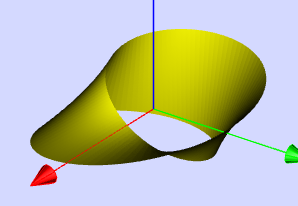
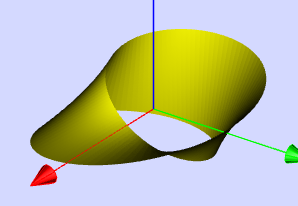
- "The band is a Möbius strip , which is a band twisted by one half turn. It has only one surface: when one walks around its axis in the xy -plane, one passes both sides of the strip without needing to penetrate the surface."
- Animation and Dynamic Parameters: The simulations are animated through a time variable t. The coordinate functions can also include three constants (a, b, v) that can be adjusted using sliders, enabling dynamic manipulation of the surface's shape and animation. The parameter v is specifically used to animate the surfaces by oscillating coordinates over time.
- "The functions may contain three constants a, b, v that can be changed by sliders. In the predefined functions v is used to animate the surfaces by oscillating one or more of the coordinates via time dependent terms."
- Control and Interaction: The applet offers a range of interactive controls:
- Sliders: For adjusting parameters a, b, and v, directly influencing the shape and animation of the 3D surface.
- Play/Pause/Reset: Buttons to control the animation. " Play starts the animation program..., Pause freezes the animation..., Reset recreates the initial parameters and projection."
- Mouse Interaction: Dragging with the mouse rotates the 3D view. Holding the "Strg" key while dragging shifts the view, and holding the "Shift" key while dragging zooms.
- Formula Editing: Users can directly edit the formulas for the x, y, and z coordinate functions. "You can edit the formulas in the formula fields or input completely different ones . Don not forget to hit the ENTER key after every change."
- Camera Inspector: Provides options for perspective, no perspective, planar views, and adjustment of perspective parameters.
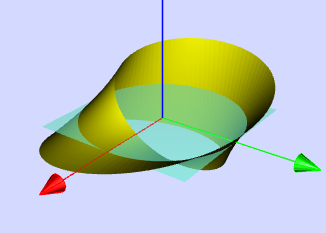
- Show Coordinates: Allows for the visualization of cutting planes through the surface.
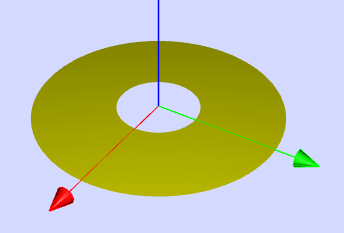
- Toggle XY-Plane: The applet starts with an x-y plane visible, which can be toggled on or off using a checkbox.
- Mathematical Concepts: The applet provides a practical and visual way to understand concepts such as:
- Parametric equations
- 3D coordinate systems
- Periodic functions and their role in creating closed or intersecting surfaces
- The topological properties of a Möbius strip, such as its single surface and one edge.
- The effect of parameters on the shape and behavior of mathematical surfaces.
- Educational Applications: The resource is explicitly designed for "Learning and Teaching Mathematics using Simulations." The inclusion of "Sample Learning Goals" and a section "For Teachers" (though content is empty in the excerpt) indicates its intended use in educational settings. The "Experiments" section provides suggested activities for exploring the applet's features and the mathematical concepts involved.
- Open Educational Resource: The platform is identified as "Open Educational Resources / Open Source Physics @ Singapore," and the content is licensed under the Creative Commons Attribution-Share Alike 4.0 Singapore License, highlighting its accessibility and potential for adaptation and reuse.
3. Key Features and Functionality:
- Predefined Function: The applet starts with a predefined function that generates animated twisted bands, including the Möbius strip. The specific formulas are provided:
- x_functions = "cos(p)*(1+q/(2*pi)*cos(a/2*p.v*t))";
- y_functions = "sin(p)*(1+q/(2*pi)*cos(a/2*p-v*t))";
- z_functions = "b*q/(pi)*sin(a/2*p-v*t)";
- Adjustable Parameters: Sliders control the values of a (number of half twists), b (height of the band), and v (speed of rotation/animation).
- "Slider a defines the number of half turns of the band. For an integer the band is closed. a = 1 results in the Möbius strip ."
- "The height of the band is defined by slider b ."
- "Slider v defines the speed of rotation."
- Visualization Tools: The applet offers various visualization alternatives accessible through mouse interactions and the Camera Inspector, allowing users to explore the 3D surfaces from different perspectives and with different rendering options.
- Experimentation: The "experiment" section provides eleven guided explorations to encourage active learning and discovery using the applet. These range from observing the single-surface nature of the Möbius strip to modifying formulas and predicting the resulting shapes.
4. Target Audience:
The applet is primarily intended for:
- Mathematics students at various levels (potentially secondary and junior college, given the mention of "Junior College" in popular tags on the main site).
- Mathematics teachers looking for interactive tools to illustrate concepts related to parametric equations, 3D geometry, and topology.
- Anyone interested in visualizing mathematical surfaces and exploring the properties of shapes like the Möbius strip.
5. Potential Uses:
- Classroom demonstrations of parametric surfaces and the Möbius strip.
- Interactive exercises for students to manipulate parameters and observe the effects on the shapes.
- Exploration of different mathematical functions and their resulting 3D forms.
- Visual aid for understanding topological concepts like single-sided surfaces.
6. Technical Aspects:
- The applet is implemented in JavaScript and HTML5, making it accessible through web browsers without the need for additional plugins.
- It utilizes the EasyJavaScriptSimulations (EjsS) framework (implied by the mention of the EjsS license on the main site).
- The embed code provided allows for easy integration of the simulation into other webpages.
7. Credits:
The applet is credited to Dieter Roess, Fremont Teng, and Loo Kang Wee, acknowledging the developers and contributors.
8. Related Resources:
The surrounding content on the webpage lists a vast number of other JavaScript/HTML5 simulation applets covering various topics in physics and mathematics, suggesting a rich collection of open educational resources available on the platform.
9. Conclusion:
The "Eye Catcher 3D Surface JavaScript Simulation Applet HTML5" is a valuable and interactive tool for learning and teaching mathematics, particularly in the realm of 3D geometry and parametric surfaces. Its focus on the visually intriguing Möbius strip, combined with user-friendly controls and the ability to edit the underlying mathematical formulas, makes it an engaging resource for students and educators alike. The open educational resource nature of the platform further enhances its accessibility and potential impact.
Eye Catcher 3D Surface Simulation Study Guide
Quiz
- What is the primary function of the "Eye Catcher 3D Surface JavaScript Simulation Applet HTML5"?
- Describe the visual elements present at the start of the simulation, as mentioned in the "About" section.
- According to the text, what mathematical concept is the predefined function in the simulator based on?
- Explain the role of the slider labeled "a" in shaping the displayed band. What distinguishes integer and non-integer values of "a"?
- How does the slider labeled "v" affect the animation of the 3D surface when the "Play" button is activated?
- What is the range of values for the variables p and q in the simulation, and why are these ranges significant?
- List three ways a user can manipulate the viewpoint or projection of the 3D surface using the mouse.
- What is the purpose of the "Camera Inspector," and how can a user access it within the simulation?
- According to experiment E2, what shapes are generated when the parameter a is set to 0, both with and without a value for b?
- What does experiment E1 instruct the user to do, and what concept about the Möbius strip is it designed to illustrate?
Quiz Answer Key
- The primary function of the applet is to display animated surfaces in 3D, including open or closed twisted bands like the famous Möbius strip, using predefined or user-defined parametric equations. It allows for the visualization and manipulation of these mathematical surfaces.
- At the start of the simulation, a projection of a closed band in space is visible under perspective distortion. This band is embedded within an x y z tripod and is accompanied by the x y-plane defined by z = 0, which can be toggled on or off.
- The predefined function in the simulator is based on the concept of parametric surfaces in 3D space, where the x, y, and z coordinates are defined as functions of two variables, p and q, and can also include time t for animation.
- The slider "a" defines the number of half turns of the band. When "a" is an integer, the band is closed. An even integer results in a normal two-sided band with a/2 full twists, while an uneven integer creates a Möbius-like one-sided band with a half twists. If "a" is not an integer, the band is not closed.
- When "Play" is activated, the animation starts by increasing the time variable t linearly. The slider "v" defines the speed of the rotation of the band around its symmetry axis due to the periodic modulation terms in the coordinate functions.
- The range of variables p and q extends from -π to +π. This range is significant because it creates full cycles in the periodic trigonometric functions used in the formulas, ensuring the generation of closed or repeating sections of the surface.
- Three ways to manipulate the viewpoint are: Rotation by dragging the mouse within the tripod, Shift by dragging while holding the Strg key, and Zoom by dragging while holding the Shift key.
- The "Camera Inspector" is a tool that allows users to change the projection of the 3D scene, offering options like perspective, no perspective, and planar views (xy, yz, yx). It is accessed by right-clicking within the applet area and selecting the Camera option under Elements/drawing 3D panel.
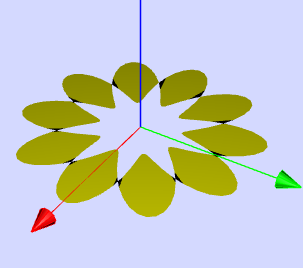
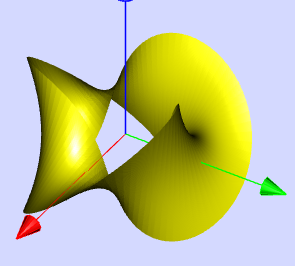
- According to experiment E2, when a = 0, a truncated, reversing cone is displayed. If b is also set to 0, a breathing ring is displayed instead of the band or cone.
- Experiment E1 instructs the user to run the animation, rotate the 3D frame, and follow the band's periphery with the mouse. This exercise is designed to demonstrate the key characteristic of a Möbius strip: it has only one continuous surface and two sides that can be traversed without lifting the pointer.
Essay Format Questions
- Discuss how the parameters a, b, and v, along with the time variable t, collectively influence the shape and animation of the Möbius strip and other 3D bands in the simulation. Provide specific examples of their effects based on the provided text.
- The "Eye Catcher" applet emphasizes the visualization of parametric surfaces. Explain the concept of parametric equations in the context of this simulation and discuss the advantages of using this approach for representing complex 3D shapes like the Möbius strip.
- Explore the interactive features of the "Eye Catcher" simulation and analyze how these features enhance the learning experience related to 3D geometry and topology. Consider specific functionalities like rotation, zoom, the Camera Inspector, and the ability to edit formulas.
- Based on the experiments suggested in the source material, describe how a user can explore the properties of a Möbius strip and differentiate it from a standard two-sided band using the simulation. Focus on the role of the "a" slider and the visual outcomes.
- The "Eye Catcher" applet allows users to modify the predefined functions. Discuss the potential educational benefits and challenges of this feature in learning mathematics and exploring the relationship between equations and their corresponding 3D surfaces.
Glossary of Key Terms
- 3D (Three-Dimensional): Having or appearing to have length, breadth, and height. In this context, referring to surfaces and objects that exist in three spatial dimensions (x, y, z).
- Parametric Surface: A surface in three-dimensional space defined by parametric equations, where the coordinates of the points on the surface are expressed as functions of two parameters (in this case, p and q).
- Möbius Strip: A non-orientable surface with only one side and one boundary component. It is formed by taking a rectangular strip, twisting one end by 180 degrees, and then joining the ends together.
- Animation: The technique of making static images appear to move. In this applet, the surfaces are animated through time-dependent terms in their parametric equations, controlled by the variable t.
- Coordinate Functions (fx, fy, fz): The mathematical functions that define the x, y, and z coordinates of the points on the 3D surface in terms of the parameters p and q (and potentially time t).
- Periodic Functions: Functions that repeat their values in regular intervals or cycles. In this simulation, trigonometric functions (sine and cosine) of p and q are used, leading to closed or repeating surfaces.
- Perspective Distortion: A visual effect that makes objects appear smaller as they are farther away from the viewer, creating a sense of depth. The simulation starts with this type of projection.
- x y-plane (z = 0): A flat, two-dimensional plane in the 3D coordinate system where all points have a z-coordinate of zero. It serves as a reference plane in the simulation.
- Half Twist: A 180-degree rotation applied to one end of a strip before joining it to the other end, a key characteristic in the formation of a Möbius strip.
- Modulation Terms: Additional components in the coordinate functions that introduce variations or changes to the basic shape, often controlled by parameters or time, leading to animation or more complex forms.
Sample Learning Goals
[text]
For Teachers
Eye Catcher 3D Surface JavaScript Simulation Applet HTML5
Instructions
Control Panel

Analytical Curve Function Fieldboxes

Toggling Full Screen
Play/Pause and Reset Buttons

Research
[text]
Video
[text]
Version:
Other Resources
[text]
Frequently Asked Questions about the 3D Surface JavaScript Simulation Applet
1. What is the purpose of the Eye Catcher 3D Surface JavaScript Simulation Applet?
This applet is designed to visualize and animate parametric surfaces in three dimensions, including the Möbius strip and other twisted bands. It serves as an interactive tool for learning and teaching mathematics, particularly the concept of parametric equations and the properties of 3D shapes.
2. How does the simulation work?
The simulation uses JavaScript to plot surfaces based on three coordinate functions: x = fx(p, q, t), y = fy(p, q, t), and z = fz(p, q, t). These functions map points from a 2D plane (defined by variables p and q) to a 3D space (x, y, z). The inclusion of periodic functions in terms of p and q allows for the creation of closed or intersecting surfaces. The time variable t and adjustable parameters (a, b, v) enable animation and shape manipulation.
3. What is a Möbius strip, and how is it represented in this simulation?
A Möbius strip is a surface with only one side and one boundary, formed by twisting a strip by 180 degrees and joining its ends. In this simulation, the predefined functions with a specific value for the parameter a (specifically a = 1) generate a Möbius strip. The simulation allows you to visually explore its unique property of having a single continuous surface.
4. How can I interact with the 3D surface in the applet?
You can interact with the 3D visualization in several ways:
- Rotation: Click and drag the mouse within the tripod frame to rotate the view.
- Shift: Press and hold the "Strg" key while dragging the mouse to shift the viewpoint.
- Zoom: Press and hold the "Shift" key while dragging the mouse to zoom in or out.
- Reset: Click the "Reset" button to return to the initial projection and parameters.
- Show Coordinates/Cutting Plane: Press and hold the "Alt" key while clicking and dragging on the surface to display a cutting plane through it.
- Camera Inspector: Right-click within the applet to access a context menu where you can select "Camera" options to adjust perspective (perspective, no perspective, planar views) and other parameters.
5. What are the roles of the sliders labeled a, b, and v?
These sliders control constants within the coordinate functions:
- Slider a: Defines the number of half twists in the band. Integer values result in closed bands. a = 1 creates a Möbius strip. Even integers create normal two-sided bands, while odd integers create Möbius-like bands. Non-integer values result in open bands.
- Slider b: Defines the height or width of the band.
- Slider v: Controls the speed of rotation of the animated surface when the "Play" button is activated.
6. Can I modify the predefined surfaces or create my own?
Yes, you can modify the predefined coordinate functions by editing the formulas in the "formula fields" provided. You can also input completely different functions to create entirely new 3D surfaces. Remember to press the "ENTER" key after making any changes to the formulas.
7. How does the animation work, and what are the functions of the "Play," "Pause," and "Reset" buttons?
The animation is driven by the time variable t, which increases linearly when the "Play" button is clicked (starting from zero). The periodic modulation terms in the coordinate functions, influenced by t and the parameter v, cause the band to rotate around its symmetry axis.
- Play: Starts the animation.
- Pause: Freezes the animation at its current state.
- Reset: Returns the simulation to its initial parameters and projection.
8. What learning opportunities does this simulation offer?
This simulation offers a hands-on approach to understanding:
- Parametric equations: How 3D surfaces can be defined by mathematical functions of two variables.
- Geometric properties of surfaces: Exploring the single-sided nature of a Möbius strip versus two-sided bands.
- Effects of parameters on shape: Observing how changing the constants a, b, and v alters the form and behavior of the surfaces.
- Visualization in 3D space: Developing spatial reasoning skills through interactive manipulation of the objects and viewpoints.
- Mathematical experimentation: Allowing users to modify equations and observe the resulting changes in the visualized surfaces.